
Super Mario 63 Redux
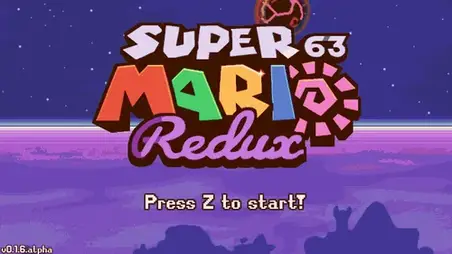
Super Mario 63 Redux is a stunning remaster of the legendary Super Mario 63, one of the most beloved Flash games ever created. Originally developed by Runouw over a decade ago, the original SM63 captivated millions of players with its ambitious blend of Super Mario 64 and Super Mario Sunshine mechanics in a 2D platformer. This Redux version takes everything that made the original great and enhances it with custom artwork, a remixed soundtrack, refined gameplay, and modern features like controller support.
| Feature | Details |
|---|---|
| Game Type | Fan-made 2D platformer (remaster) |
| Platform | PC (browser-based demo available on itch.io) |
| Current Version | Tiny Demo (Title Screen, Main Menu, Tutorial 1) |
| Graphics | Custom art style with enhanced visuals |
| Soundtrack | Fully remixed soundtrack |
| Special Abilities | FLUDD mechanic, Spin, Ground Pound |
| Controller Support | Yes, for an improved gaming experience |
| Developer | Fan community (open source project) |
| Original Creator | Runouw (Super Mario 63) |
| Feedback | In-game feedback menu (F1 or top-left button) |
What Makes Super Mario 63 Redux Special?
Super Mario 63 Redux is not just a simple port of the original game. The development team rebuilt the experience from the ground up with significant improvements across every aspect. The custom art style gives the game a fresh visual identity while staying true to the spirit of the original. Every sprite, background, and effect has been carefully redesigned. The remixed soundtrack breathes new life into familiar tunes, and the addition of controller support makes the gameplay feel smoother than ever. The FLUDD mechanic from Super Mario Sunshine remains at the heart of the experience, letting Mario hover, spray water, and solve puzzles in creative ways. Shine Sprites replace the original star collectibles, adding another layer of polish to the remastered world.The Legacy of Super Mario 63
The original Super Mario 63 was a landmark in the Flash gaming era. Created by Runouw, it was one of the most ambitious fan games ever made, combining elements from Super Mario 64 and Super Mario Sunshine into a fully playable 2D experience. It featured a massive castle hub world, multiple themed levels, boss fights, and even a level editor that spawned a thriving creative community. When Flash was discontinued, many feared the game would be lost forever. Super Mario 63 Redux exists to preserve and improve upon that legacy. The project is also connected to Super Mario 127, a spiritual successor currently in development that aims to continue the ambitious vision of the original. The Redux project is open source, allowing the fan community to contribute improvements and help keep the spirit of SM63 alive.Gameplay and Features
Super Mario 63 Redux stays true to the core formula that made the original so beloved. You control Mario through a variety of platforming challenges, using a combination of classic moves and the versatile FLUDD device. The game features an enhanced UI with clearer indicators, including a water meter displayed as MAX rather than a percentage. Key features of the Redux version include:Enhanced Visuals: Completely redrawn art with a custom style that brings every level to life with more detail and personality.
Remixed Soundtrack: A fresh take on the classic tunes that captures the energy of the original while sounding modern.
FLUDD Mechanics: The Flash Liquidizer Ultra Dousing Device returns, letting you hover, spray, and navigate creative platforming challenges.
Controller Support: Plug in a gamepad for a more comfortable and precise gameplay experience.
In-Game Feedback: Press F1 or use the top-left button to report bugs and share suggestions directly with the developers.
Open Source: The project is community-driven and open source, welcoming contributions from fans everywhere.
Controls
- Arrow Keys: Move Mario left, right, up, and down.
- Z: Interact with objects and perform a Ground Pound.
- X: Spin attack.
- C: Activate FLUDD (Flash Liquidizer Ultra Dousing Device).
- P: Pause the game.
- A: Reset (desktop only).
- = / -: Zoom in and out (desktop only).
- F1: Open the in-game feedback menu.
Note for Mobile Players: Some controls such as Reset and Zoom are not available on mobile devices. The game is best experienced on desktop with a keyboard or controller.
FAQ - Super Mario 63 Redux
What is Super Mario 63 Redux?
Super Mario 63 Redux is a remastered version of the classic fan game Super Mario 63, originally created by Runouw. It features completely redrawn graphics, a remixed soundtrack, improved gameplay mechanics, and modern additions like controller support.How can I try Super Mario 63 Redux?
A tiny demo of Super Mario 63 Redux is available on itch.io, featuring the Title Screen, Main Menu, and Tutorial 1.What content is available in the demo?
The current tiny demo includes the Title Screen, Main Menu, and Tutorial 1. More content is expected as development continues.Is Super Mario 63 Redux open source?
Yes. The project has been made open source, allowing the fan community to contribute code, report bugs, and help improve the game over time.What is FLUDD?
FLUDD stands for Flash Liquidizer Ultra Dousing Device. It is a water-powered jetpack from Super Mario Sunshine that lets Mario hover, spray water, and perform special maneuvers. It is a central mechanic in Super Mario 63 Redux.What happened to the original Super Mario 63?
The original Super Mario 63 was a Flash game that became one of the most popular fan games ever made. When Flash was discontinued, the game became unplayable in modern browsers. Redux was created to preserve and modernize the experience.Tips for Playing Super Mario 63 Redux
- Master FLUDD Early: The FLUDD mechanic is essential for navigating levels. Practice hovering and spraying in the tutorial to build confidence.
- Watch for Interactive Objects: Look for white-outlined objects in the environment — these can be interacted with and often hide secrets.
- Collect Shine Sprites: Shine Sprites are the main collectibles and are crucial for progressing through the game.
- Monitor Your Water: FLUDD has a limited water supply shown as a MAX meter. Refill at water sources to keep your abilities available.
- Use the Feedback System: If you encounter a bug or have a suggestion, press F1 to open the feedback menu. Community input helps shape the game.
- Try a Controller: If keyboard controls feel awkward, plug in a gamepad for smoother and more precise movement.